Tuesday, 20 June 2023

Setting up Unit Tests in Visual Studio 2022

A very quick blog post tonight. This came about when I wanted to setup a new Unit Test project for an existing .NET 6 solution. The problem came with setting up the project package references and I couldn't remember what to add. So for future reference, the packages I added from NuGet were:

  • NUnit - The main unit-testing framework
  • NUnit3TestAdapter - This is used for running NUnit 3.x tests in Visual Studio
  • Microsoft.NET.Test.SDK - MSBuild targets and properties for building .NET test projects
The project was created as a Class library (Console Application also works but it doesn't really make sense given it's not hosting its own executable)

Add a class and within this attribute the tests to be run with either [Test]

        [Test]
        public void Test_Something()
        {
            var expected = "Something";
            var testValue = DoSomething();
            Assert.That(testValue, Is.EqualTo(expected));
        }

Or [TestCase], if you want to supply parameters

        [TestCase("Test1", 1, 2)]
        [TestCase("Test2", 2, 3)]
        public void LatLong_To_Mercator(string testName, int input, int expected)
        {
            // Run test with parameters and Asset against expected
        }

One last thing, the documentation says to add [TestFixture] to the class but this doesn't seem to be needed. The tests run anyway.

Ahha!
Beginning with NUnit 2.5, the TestFixture attribute is optional for non-parameterized, non-generic fixtures. So long as the class contains at least one method marked with the Test, TestCase or TestCaseSource attribute, it will be treated as a test fixture.

Wednesday, 22 February 2023

Avalonia and Cross Platform .NET UI

A big advantage of .NET Core is the ability to write code once that can run on both Windows and Linux. This of course has been done before with Java but for those who use C# this was a huge step forward.

Unfortunately the existing UI Frameworks, Winforms and WPF were not supported on Linux so applications like the SuperMarketPlanner, although they were upgraded to .NET Core, were only able to run on Windows. 

Fortunately though .NET Core, now being open source is building a larger ecosystem and one such addition is Avalonia. This is a modern UI framework that can target both Windows and Linux. 

I initially played around before deciding to follow the excellent tutorial to build a Music Store App.

The framework is similar to WPF. We have a markup file to describe how the UI components are arranged, the View. A ViewModel is then setup to define how to bind the view to properties and commands.

As an example I setup a simple test that used a button to load and display an image. The view below shows the Button and Image elements, with the Image Bound to the Photo property:


And the ViewModel code sets up the property to the bitmap. There is a method to load the image from a file that's called from a button command (see the Music Store App demo for how to setup the command)


And here is the application running on Windows...


And Ubuntu...


Tuesday, 6 December 2022

Where did the disk space go?

I like a good mystery. Like this evening when I saw 130GB space free on my 800GB disk partition with only 280 GB of space being reported as used. Where did all the rest of the disk go?!

First up, I ran WinDirStat as an administrator, no, still reported 280GB. What was going on here?

One cause for this apparent mismatch was System Restore points, which don't appear on Disk Usage reports, so to confirm I went and took a look.

In the search box, type Control Panel and open the Control Panel App:

Open All Control Panel Items > Recovery and select Configure System Restore:


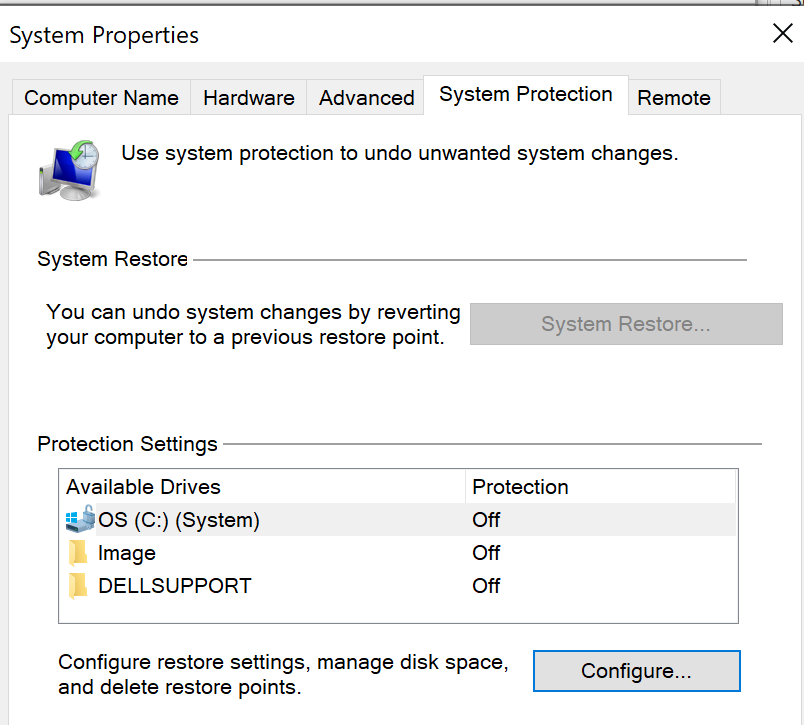
Under the System Protection tab open Configure...


The maximum size for Disk Space Usage was set to the size of the disk and 400GB had already been used...


So, setting the Max Usage back down to 10% and there, I now had a decent amount of free space.


Saturday, 26 November 2022

BAD_SYSTEM_CONFIG_INFO

Oh dear. Monday saw a bit of stress with the Desktop PC failing to start. It booted into a blue screen with BAD_SYSTEM_CONFIG_INFO.

After it automatically tried to restore, with no success I tried the steps below

Error 0x74: Bad_system_config_info - Microsoft Support

  • System Restore: No restore point found 
  • System image recovery: Made it 50% through and said it couldn't continue
  • Safe mode: Wouldn't start in any safe mode configurations. Always returned to the same blue screen

At this point I was out of options so as a last resort decided to reinstall from an ISO image

I downloaded the media creation tool from: Download Windows 10 (microsoft.com) and flashed to a USB stick. 8GB is required for this.

Then on I needed to enter the BIOS (holding Esc on startup for this) and set it to boot from the USB.

After this everything went very smoothly. My PC is connected via Ethernet to the network so nothing was required to setup the internet connection and the windows license was still applied after installation.

Finally, and most fortunately, I had actually made a full backup of the PC only the day before so I hadn't lost any data. The last step to restore was painless.

As to why it failed like this? I don't know. I ran CHKDSK afterwards and nothing untoward was reported. Perhaps a bad Windows update? Although I didn't see any reports of issues like this. 


Tuesday, 22 March 2022

Setting up a new Python environment

Over many years of working in software development, managing dependencies to you code, whether in binary or source code format has always been a pain, to be honest. Take your pick from:

  • Cut and paste code
  • Linking against common libraries
  • Coping .zip files (with suitably convoluted folder structure)
  • Installing files to a common location
    • dlls
    • .NET GAC
  • Maven
  • NuGet
  • And so on..

And now into the mix comes Python with its 2.x (OK not really now) and 3.x versions, pip and conda..

A discussion of pip and conda can be found here

Anyway, having installed a new Ubuntu partition I wanted to get back the development environment I'd been using for the last couple of years. This is what I did...

Install Visual Studio Code

It's my tool of choice for Python. On Ubuntu I followed these instructions

I then installed the Python and Pylance extensions for VS Code

To check the Python environment being used, Open the Command Palette with Ctrl-Shift-P and then Python : Select Interpreter

Install Anaconda

It has its quirks but I have been using Anaconda. I installed from scratch using the instructions here.

The default installation included all the necessary libraries for simple machine learning code. 

Installing Cirq

I've been looking at Quantum Computing over the last year using Cirq. I couldn't get this installed using the instructions here.

However python -m pip install Cirq worked and it appeared in my Anaconda base (root) environment in VS Code. Success!

Installing Pygame

And finally, for some playing around with game programming I installed Pygame  with python -m pip install pygame.

So my environment is back up and running on a new OS installation.

Monday, 7 March 2022

Arrgh! Segmentation fault

My Physics analysis code runs in 3 modes. For 1996 data, for 1997 data and for both year's data. The 3rd mode also runs over different values of cuts. This is so as to build a set of results that can be used to estimate systematic errors in the analysis. For example, changing the value of the cut on Calorimeter energy can provide an indication of how well is is modeled.

To run all these checks a number of "Steering card" files were created. Each one listing out the cuts to be made for a single batch run. The analysis would then run over the entire set of '96/'97 data for each batch in turn and build a list of result ntuples.

Now, while running '96 and '97 individually was successful, when running both, on the second iteration the process crashed with the following.


The dreaded Fortran segmentation fault! 

In years gone by, I would have taken the approach of writing loads of print(*,*) statements around the "ANALYSE: File contains..." log and eventually homed in on the offending code but surely I can do better now!

It turns out I can. I can add a DEBUG flag: -fcheck=all -g

This is much more useful

(fcheck=all adds runtime checks for array bounds amongst other checks, -g adds extra information for the gdb debugger)

The line in isr_cuts96.fpp is:

call hf1(510,temp,1.)

This is filling a histogram  with data. The fact it's failing on the second iteration of the batch suggests the histogram isn't being correctly cleared down after the first run. 

The module I have to do the clearing down is called terminate.fpp

A review of the HBOOK User Guide led me to needing this call

CALL HDELET ID
Action: Deletes a histogram and releases the corresponding storage space.
Input parameter description:
ID identifier of a histogram. ID deletes all existing histograms.

Adding this to terminate.fpp fixed the problem and I am now able to run multiple batches in the same process

call hdelet(0)

Why this ran OK back in 2000 is probably a combination of the older CernLib library and Fortran compiler.

Monday, 31 January 2022

Updating from .NET Core 3.2 to .NET 6.0

With a couple of projects on .NET Core 3.2 I thought I would update to .NET 6.0. This was pretty simple!

First, update the TargetFramework in the project references to net6.0:
     <TargetFramework>net6.0</TargetFramework>

Next, I took the opportunity to update NuGet references to the latest versions. I also cleared the NuGet cache with:
     dotnet nuget locals --clear all

At this point Visual Studio 22 Intellisense started warning that references were missing, although the code compiled properly and the Test Runner couldn't fine any of the tests. To resolve this I deleted the .vs folder and restarted.

In the SuperMarketPlanner XAML application, to fix a new compiler warning, I changed the Project SDK in the csproj from
    Project Sdk="Microsoft.NET.Sdk.WindowsDesktop"
to 
    Project Sdk="Microsoft.NET.Sdk"

Finally, in the Azure Pipeline yaml I had to update the SDK to the following:

steps:
- task: UseDotNet@2
displayName: 'Install .NET Core 6.0.x SDK'
inputs:
version: 6.0.x
performMultiLevelLookup: true